
FreeStyle Football 2 Match Controls
Xbox-style face buttons, jockey, special combos, and why a pad still beats a keyboard.
FreeStyle Football 2 reads like an Xbox or FC pad on purpose. WOORE wants the face buttons to feel obvious so the skill ceiling can live in timing, jockey, and Key Moves rather than in a 40-bind spreadsheet. This page lists only the bindings confirmed from creator videos. It does not invent a full keyboard table. If you still need the match rules those buttons serve, read How to Play first, then come back here to lock the inputs.
Controller layout testers actually used
On an Xbox-style pad, pass and intercept sit on A. Shoot sits on B (Circle on PlayStation). Slide sits on X (Square on PlayStation). Jockey is L2. Power and special combos use L1 plus R1. That is the whole confirmed core. Everything else you think you remember from FC, Rematch, or the original FreeStyle Football might be wrong in this build. Do not copy a 2017 forum chart onto a 2026 UE5 client.
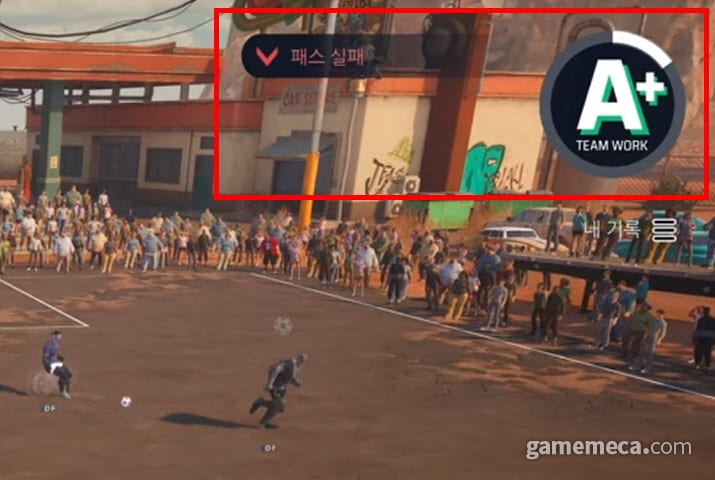
Pass and intercept sharing A is the design, not a bug. If you are facing a teammate, A plays the pass. If you are facing an opponent’s pass, A is the interception window. That is why Teamwork Rank can spike on a defender who never shoots. Stand in the lane, time A, and you have stolen a half without a slide. Mash A while turned the wrong way and you will auto-pass into trouble, which is the complaint testers already logged.
Shoot on B is a charged action in spirit even when the UI is quiet. Tap for a safer strike; hold when you have the extra yard and the AI keeper is already moving. Slide on X is high reward and high regret. There are no fouls and no cards, so the game will not yellow-card a wild lunge. The other four humans plus the AI keeper will still punish you. Slide when the attacker has committed a touch, not when you are late and angry.
Jockey, bumpers, and Freestyle inputs
L2 jockey is the defensive stance. Hold it to stay in front of a dribbler, match their cuts, and keep your body between ball and net. If you only sprint, Queen Swift and Butter will make you look planted. Jockey first, then A for the intercept, then X if they finally take a heavy touch. That order is the entire defender tutorial compressed into one sentence.
L1 plus R1 is the confirmed power and special combo layer. Key Moves and Freestyle Moves live in that neighborhood. Each character has two Freestyle Moves with long cooldowns, about 90 to 150 seconds. The combo is not “press both bumpers and hope.” Face the direction of the move, have the ball or the duel you need, then commit. Burning a Freestyle Move while standing still in your own half is how you gift the next five minutes of a four-minute half.
Clutch skills are passive. There is no extra button to “turn on” Mukamba’s stamina and defense buff or a heal-style pass. You pick the character, and Clutch is already running. If a YouTube overlay draws extra glyphs around Clutch, treat them as flavor, not as binds this wiki will guess at.
Keyboard, mouse, and why the pad still wins
Steam supports keyboard and mouse and controller on the same PC. That matters for accessibility and for players who refuse to plug in a pad. Creator videos, including the first-day footage embedded here, still play on a controller. If you insist on keyboard, open the in-game mapper, bind pass, shoot, slide, and jockey to keys you can hit without looking, and accept that L1 plus R1 combos will feel worse until you build muscle memory. This page will not fabricate a WASD chart that no official source published.
Console players on PS5 and Xbox Series X|S can ignore the keyboard paragraph. Cross-play still means you will meet PC pads and the occasional mouse user.
Camera, HUD, and a practice loop
Camera angle complaints are the other half of “controls.” The default broadcast view is the one you should keep for the first several matches. If you cannot see a runner, nudge the right stick slightly and then stop. Constant camera work is how you miss the A intercept window. Teamwork Rank sits on the HUD; glance at it between pauses, not during a 1v1. Pauses happen on goals, line-outs, and offsides. Use those seconds to reset the stick, not to open a menu.
A useful practice loop after Getting Started is two tutorial repeats, then two live matches using only A, B, X, and L2. No bumper combos. If you can pass to a marked teammate, shoot after a second action, slide once per half, and jockey a dribbler without diving, you are ready to add L1 plus R1. Then take that same rule set onto whatever pitch loads and compare notes with Maps and Pitches. Ranked stacks belong in Ranked and Clubs. Lounge contracts in the Story Mode Guide do not change the face buttons. The Guides Hub links the rest.
If camera tilt starts ruining matches, drop the right stick, return to the default broadcast angle, and play two more games on the four simple inputs. Fancy bumper combos can wait until pass, shoot, slide, and jockey are automatic. That is the control ceiling that actually shows up in Prime OBT, not a spreadsheet of unconfirmed keys.
Frequently Asked Questions
Quick answers for Agents heading into Prime OBT and launch.
What are the confirmed controller buttons?
Pass and intercept on A, shoot on B or Circle, slide on X or Square, jockey on L2, and power or special combos with L1 plus R1. This wiki does not invent extra binds.
Does PC have a keyboard layout?
Steam supports keyboard and mouse plus controller. There is no official public keyboard table worth copying here. Map pass, shoot, slide, and jockey in-game, or use a pad.
Is there a dedicated intercept button?
Intercept shares the pass face button. Face the passing lane and time A instead of sliding at every touch.
How do Freestyle Moves work on a pad?
They are character ultimates on long cooldowns, about 90 to 150 seconds, using the L1 plus R1 special layer. Direction and timing matter; they are not a panic button.
Should I change the camera immediately?
No. Keep the default broadcast angle for several matches. Testers complained about camera, but constant right-stick fiddling hides the intercept window.